> ## Documentation Index
> Fetch the complete documentation index at: https://superflow-claude-superflow-mcp-docs-distribution-b0cixg.mintlify.site/llms.txt
> Use this file to discover all available pages before exploring further.

# How to delete comments

## How to Delete Comments

In this article, you will learn how to delete existing comments.

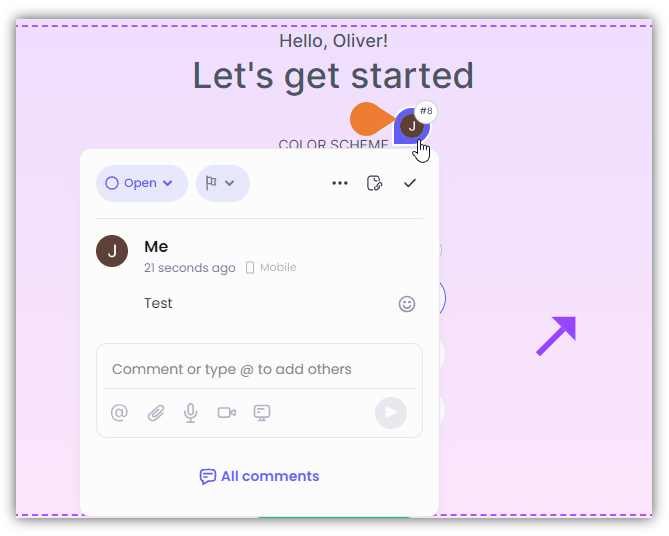
1. On the screen, find and click the **Comment** you want to delete.
<Frame>
  <img src="https://mintcdn.com/superflow-claude-superflow-mcp-docs-distribution-b0cixg/KtJ8Km680nUWIDhy/images/how-to-guides/how-to-delete-comments/DC1FINAL.png?fit=max&auto=format&n=KtJ8Km680nUWIDhy&q=85&s=07b4f9c9a490c7b110dbceef49dce8c1" alt="" width="669" height="536" data-path="images/how-to-guides/how-to-delete-comments/DC1FINAL.png" />
</Frame>

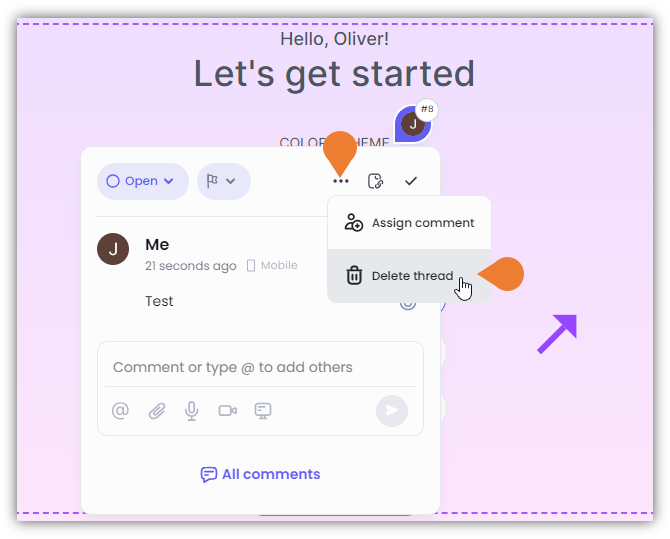
2. The **Comment Box** will appear, click the **Menu** (...) to enable more options.
<Frame>
  <img src="https://mintcdn.com/superflow-claude-superflow-mcp-docs-distribution-b0cixg/KtJ8Km680nUWIDhy/images/how-to-guides/how-to-delete-comments/DC2FINAL.png?fit=max&auto=format&n=KtJ8Km680nUWIDhy&q=85&s=524daa2c7dc8ab5d5a6d19ad4066540f" alt="" width="670" height="539" data-path="images/how-to-guides/how-to-delete-comments/DC2FINAL.png" />
</Frame>

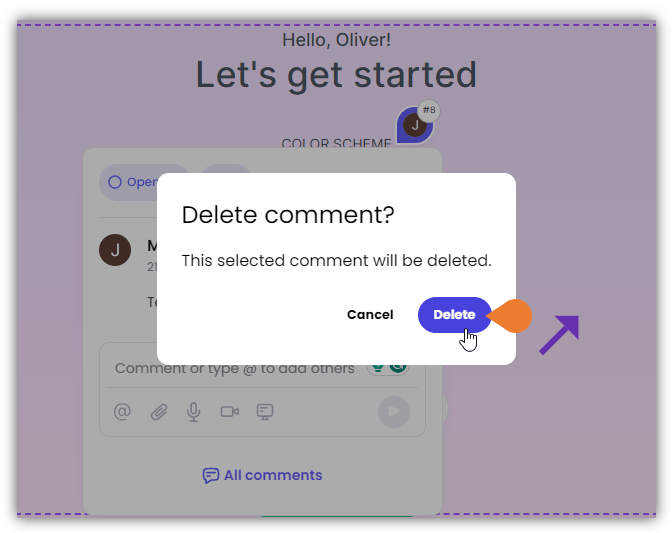
3. Click **Delete Thread**. A **Confirmation** dialog box will appear. Click **Delete** to continue deleting the comment.
<Frame>
  <img src="https://mintcdn.com/superflow-claude-superflow-mcp-docs-distribution-b0cixg/KtJ8Km680nUWIDhy/images/how-to-guides/how-to-delete-comments/DC3FINAL.png?fit=max&auto=format&n=KtJ8Km680nUWIDhy&q=85&s=1c6a64f7716a1113b224e9b199020974" alt="" width="672" height="533" data-path="images/how-to-guides/how-to-delete-comments/DC3FINAL.png" />
</Frame>
